
Relief Valve Series | Episode 04
You do not need a perfect filing system.
You need a retrieval system that works when your brain is tired.
What this episode solves
Most micro business owners do not lose files because they are careless.
They lose files because real work moves faster than folder discipline.
A client sends a contract.
A vendor updates a quote.
A receipt gets downloaded twice.
A draft becomes final, then final-final, then the deeply suspicious real-final-version-3.
Eventually, the file still exists somewhere, but finding it becomes its own task.
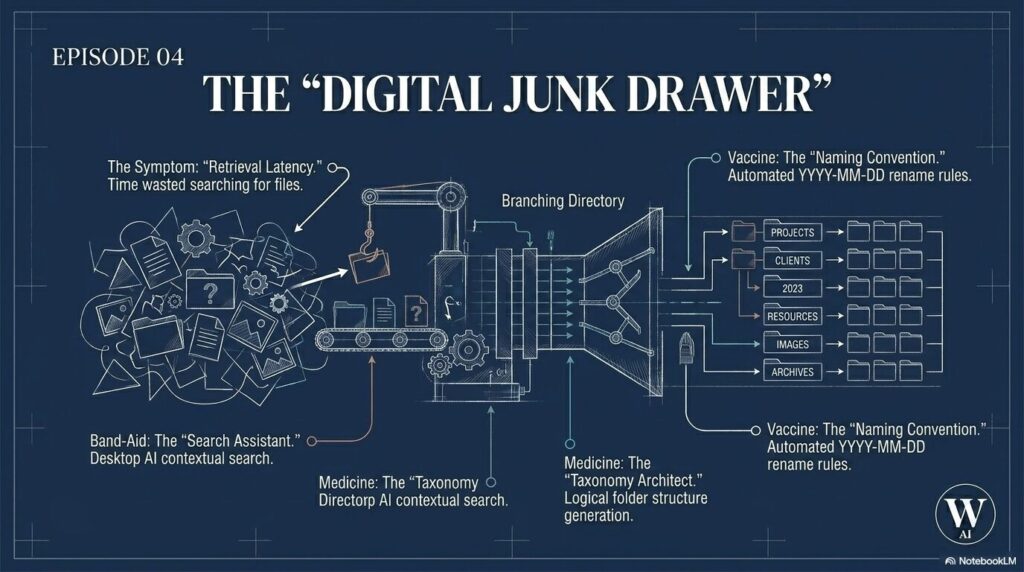
We call that retrieval latency.
It is the friction between knowing a document exists and being able to put your hands on it when the work actually needs to move.
In this episode, we open the Relief Valve on file organization. The goal is not to turn you into a digital librarian. The goal is to help you build a simple, AI-supported structure so your files stop draining time, attention, and trust.
The 3 Levels of Relief
1) Bandage: The Search Assistant
When you are stuck and need the file now, stop manually digging through every folder.
Use a secure AI search assistant inside your existing business workspace, such as Microsoft 365 Copilot or Google Gemini for Workspace, to search by meaning instead of exact keywords.
Instead of trying to remember whether you named something “contract,” “agreement,” “SLA,” or “client renewal,” ask for the file in plain language:
“Find the agreement I sent to Client Alpha last week about the software renewal.”
That is the value of semantic search. It can use context, dates, people, and related terms to help locate the right document.
The important boundary: only use this approach inside tools and accounts you trust for business data. Do not upload private client files, sensitive records, or messy folder screenshots into public AI tools without checking privacy and data-use settings first.
The Search Assistant stops the panic.
It does not fix the junk drawer.
2) Medicine: The Taxonomy Architect
Once the immediate file is found, the next step is structure.
Take a screenshot of your messy desktop, downloads folder, or root business folder. Or generate a simple text list of the current file names.
Then ask a secure AI assistant to propose a simple five-folder structure based on the way your business actually works.
For many micro businesses, the first version might look like:
- Finance
- Operations
- Marketing
- Legal
- Clients or Projects
The point is not to create the world’s most elegant folder tree.
The point is to stabilize the major systems first.
Do not spend a full weekend opening every old file, reading it, and dragging it into hyper-specific subfolders. That creates more friction. Start with broad, useful categories that make retrieval easier and reduce decision fatigue.
A good taxonomy helps your future self know where something belongs before the workday gets chaotic again.
3) Vaccine: The Naming Convention
A folder structure helps.
A naming convention prevents the drawer from refilling with mystery files.
The one-touch naming protocol gives every important file the same predictable structure:
YYYY-MM-DD_CATEGORY_ENTITY_SHORT-DESCRIPTION_VERSION
Example:
2026-05-01_FIN_Client-Alpha_tax-summary_v01
Why this works:
The date at the front keeps files sortable, even when cloud storage changes the “date modified” field.
The category ties the file back to your main folder structure.
The entity tells you which client, vendor, project, or business relationship the file belongs to.
The short description keeps the name readable.
The version number ends the reign of “final,” “final-final,” and “real-final-this-time.”
Once the pattern works manually, you can automate pieces of it with tools like Microsoft Power Automate, cloud folder rules, or basic operating system shortcuts.
The goal is not to make you type longer file names forever.
The goal is to build a system clear enough that automation can help.
Two Angles, One Outcome
Verónica’s Take: Structure Before Speed
When a system is under pressure, speed alone does not fix the problem.
If your files are scattered, duplicated, poorly named, and full of sensitive information, AI search may help you find one document faster, but it can also expose how fragile the underlying system has become.
Digital clutter is not just visual clutter.
It affects trust, handoffs, risk, and decision quality.
A better workflow gives each file a home, a name, and a reason to exist. That is how we move from internal chaos to external control.
Jason’s Take: Time, Cost, and Future-Proofing
Ten minutes looking for a file does not sound dramatic.
But ten minutes a day becomes more than 50 hours a year.
That is more than a full work week spent fighting your own search bar.
File organization is not busywork when it protects time, reduces rework, and prepares your business for future AI tools.
The cleaner your business data is today, the more useful AI support can become tomorrow.
Messy files do not just slow humans down. They confuse the systems you may eventually rely on.
Safety Before Speed
AI can help you find, sort, and rename files, but file organization often touches sensitive business data.
Before using AI to analyze folders, screenshots, file names, or document contents:
- remove client names when possible
- avoid putting Social Security numbers, passwords, health details, financial account numbers, or private legal information in file names
- use placeholders like Client Alpha, Vendor Blue, or Project North
- check whether your tool uses uploaded content for training
- keep sensitive files inside managed business systems
- verify AI-generated labels, summaries, and file names before making them permanent
A practical rule: if you would not say it out loud in a crowded coffee shop, do not put it in a file name or an AI prompt.
Colorado AI note: The practical baseline for small businesses is still clear. Be transparent when AI is involved, protect personal data, and keep human review in the loop when decisions or records matter.
AI can suggest the structure.
You remain responsible for the system.
Try this today
The next time you are frustrated by your digital junk drawer:
- Pick one messy folder, not your whole computer.
- Take a screenshot or export a simple list of file names.
- Remove or mask sensitive names and private details.
- Ask AI to suggest five broad folder categories.
- Choose one naming pattern for future files.
- Rename five current files using the pattern.
Do not start with perfection.
Start with retrieval.
The win is simple: the next file should be easier to find than the last one.
Episode Resources
- Listen on Spotify
- Watch on YouTube
- Download: Taxonomy Architect Starter Prompt
- Download: One-Touch Naming Convention Guide
- Read next: Episode 05, “Creep Factor”
- Visit the Relief Valve Series Hub
Closing Thought
The goal is not to organize every file perfectly.
The goal is to stop paying a daily tax to your own digital clutter.
AI can help surface patterns in the clutter, but your business context decides what belongs where. Use the tool to reduce search friction, then turn the pattern into a habit.
End Transmission.